
Archive for the 'Applications' Category

Add to your Google Calendar (and more) with IM

Tuesday, February 6th, 2007


The other night I was talking with a friend about how great it would be to be able to access my Google Calendar from my Sidekick in order to add and view events. We lamented about the lack of a solution even though it seems like it should be possible. Then I heard about IMified this morning. IMified describes their service as such:

Imified is an instant messenger buddy that works across all major IM networks and offers access to a growing number of web applications, as well as productivity tools like notes, reminders, and todo’s. Imified helps you get things done faster.

In short, you can send an IM to their bot and Edit or View information on your different web-based applications such as Google Calendar, WordPress, Blogger, Backpack, etc. It just launched, so it’s totally beta at this point and bugs are expected as they work out the real-world usage. But so far it looks very promising! It’s also perfect for the Sidekick user as Instant Messaging is built into the device and always available. There are even shortcuts to save you the hassle of multiple IMs. Here are some more details on IMified:

Supported IM Clients:
– AIM
– Yahoo
– MSN
– Googletalk/Jabber

Supported Services:
– 30 Boxes
– Backpack
– Basecamp
– Blogger
– Google Calendar
– MoveableType
– Remember the Milk
– TypePad
– WordPress
– IMified Notes (for when you go over 50 notes on the Sidekick)
– IMified Reminders
– IMified Todos

We recommend checking it out now if you’re willing to put up with the bugs, or else just give them a few weeks and check them out when they’ve ironed out the initial issues.
T-Mobile Email Spam Cleaner

Tuesday, November 28th, 2006


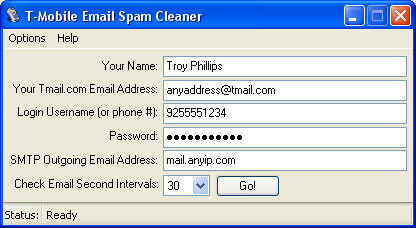
Anyone that has an @tmail.com more than likely has received some spam (or else you’re very lucky). With the Sidekicks there is currently no support for filtering so most of the time it’s just a daily delete of spam. There weren’t many solutions to this problem currently other than “put up with it” or “tell T-Mobile to change your email address”. But now, thanks to Troy Phillips there is a new fix to the spam epidemic on the Sidekick.

Troy has written an application that basically logs into your TMail account and filters the email for you based on a few pre-set rules, a whitelist (email addresses to always accept from), and a blacklist (email addresses to reject). It won’t wipe anything out completely, it will just drop it in the Trash where you can periodically go in and check to see if anything accidentally got tagged as spam. It’s a bit of a hack, and might not be something for the “non-techie” Sidekick users, but at least it’s something while we wait for Danger to implement spam filtering.

More info and download at https://sidekick.troyphillips.com/

OTA 3.1 changes

Sunday, October 29th, 2006

We’ve been waiting and waiting for an official changelog for the 3.1 OS, but haven’t seen anything official yet. However, on the Hiptop.com forums (not associated with hiptop3.com) jenniferkvm posted the following:

The list updates I have handed down from my bosses include:

Correction to the battery level indicator.

Correction to battery charging icon. Previously the icon displayed charging even when th battery was fully charged. The OTA fixes this.

Previously the device might have had problems with powering on when the power button was used to power off. The OTA fixes this.

Previously, the clicking DONE in the address book will not save/close an address book edit. The OTA fixes that.

Som beeps in the sounds profile did not also flash the trackball. OTA fixes.

OTA will ensure that redialing occurs when button on headset is pushed after busy signal.

Added Menu + Cancel shortcut in Music Player to remove menu item in playlist editing menu.

Media Player used to be case sensitive when sorting playlists. After OTA, it is not case sensitive when sorting alphabetically.

OTA will allow deletion of multiple selections from a playlist.

Device locking up after going to “sleep”. OTA fixes that.

Fixes echo in Speaker mode.

Battery Cover Notification is noticable when keyguard is activated.

AND Lastly ( I know I saw a couple of threads on this):

Ya know how when you answered a call and the person on the other end couldn’t hear you for a few seconds? Drove ya NUTS!
Yeah, the OTA fixes that……

There’s your list kids……

No More Missing Sync

Friday, September 29th, 2006

Mark/Space on Friday announced that it’s discontinued development of its Missing Sync for Hiptop, the software that lets Mac users exchange data with Danger Hiptop devices — commonly known to T-Mobile users as the Sidekick.

“It is unfortunate, but the market for this product does not support continued development,” said a company spokesman in a statement.

Read for more info on refunds and cross-upgrades

Hiptop 3 is coming to Suncom!

Friday, September 15th, 2006

The emails were sent out, SunCom will soon be selling the Hiptop 3. And as always, the SunCom customers luck out, as they will get discounts (33-50%) on apps and games that they already purchased for the Sidekick II. This discount does not apply towards ringtones though. Thanks to one of our readers for forwarding the full email:

On Thu, 14 Sep 2006 3:06, SunCom Wireless wrote:
>
> Be the first to get your hiptop3 so you can listen to music, surf the
> Web faster, take better photos, use Bluetooth headsets to make calls,
> and just look cooler with a brand new phone! The hiptop3 will be
> available from SunCom Wireless online at www.suncom.com and in stores
> on September 18, 2006 – just FIVE DAYS away!
>
> The hiptop3 is only $299.99 with a 2-year extension to your contract;
> or, you can get it for just $349.99 with a 1-year contract extension
> or $399.99 without an extension to your contract. Your SunCom
> Wireless Sales Associate can help determine your eligibility.
>
> And there’s more good news. You get a discount on the games and
> applications that you currently own on your hiptop2. The Catalog
> content you will see on your hiptop3 was updated to be compatible with
> the new device. So when you upgrade, you will need to purchase any
> content you wish to have on your hiptop3. But if you already have
> hiptop2 content, you’ll enjoy discounts* of 33% to 50% when you
> download hiptop3 games and applications that you currently own.
>
> Now, go on… hook up and get hip!
>
> -SunCom Wireless
> —————————-
> * Discounted pricing excludes ringtones. All prices and dates are
> subject to change.
>
> hiptop is a registered trademark of Danger, Inc. Bluetooth is a
> registered trademark of Bluetooth SIG, Inc.
>
> If you have any questions about our privacy policy, please visit
> https://www.suncom.com/privacy.shtml

Time Traveler returns to the Sidekick catalog

Thursday, September 14th, 2006


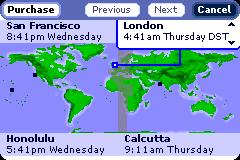
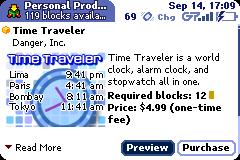
As many of you have probably already noticed, the Time Traveler app is back in the T-Mobile catalog. It was previously pulled due to some bugs. Hopefully those have all been squashed and you can get your handy time zones and alarms again. You can even find out what time it is in Black Rock City, NV! Although they’re a bit late for this year. Let us know how it is! From the catalog:

With Time Traveler, you can keep track of the time in four cities at once, from a selection of over 100 cities. You can also set multiple alarms, each with a different alarm sound. Other features include analog clock mode and timer function.

13 Tips for Improving Camera Phone Photos

Thursday, July 13th, 2006


Looking for some tips on improving to quality of the pictures taken with your Sidekick? Here are some generic tips that apply to most camera phones:

13 Tips for Improving Camera Phone Photos

Some of these don’t apply to the Sidekick 3 (like the zoom), but others are useful things to keep in mind. Anyone have any additional tips that are Sidekick 3 specific? Our #1 tip, be patient and let the Sidekick 3 adjust to the light. Oh, and try to keep it still.

Terminal Monkey returns!

Wednesday, July 12th, 2006


For all the geeks out there, word is out that the Terminal Client is available in the catalog finally. It will set you back $9.99, but for those that know what it is, it’s worth it. If you don’t know what a Terminal Client is, then trust us, you don’t need it. It’s not going to impress any ladies, chances are they’ll smell a geek as soon as they see it on your Sidekick 3.