Click here for cheap no-contract Sidekicks and accessories!

Buy direct from T-Mobile : Sidekick LX, Sidekick 2008/Gekko

Archive for the 'Sidekick III' Category

Who wants to go to a party?

Tuesday, February 13th, 2007


It looks like all this D-Wade hype isn’t stopping any time soon. This just in from an anonymous source, there’s a launch party happening for the D-Wade Sidekick 3. The date, February 17th. The place, maybe someone with better eyes can find out from the pictures. The cool part? The invitation is a 6×8″ card with a basketball like texture.

DWade Sidekick 3 is official

Monday, February 12th, 2007


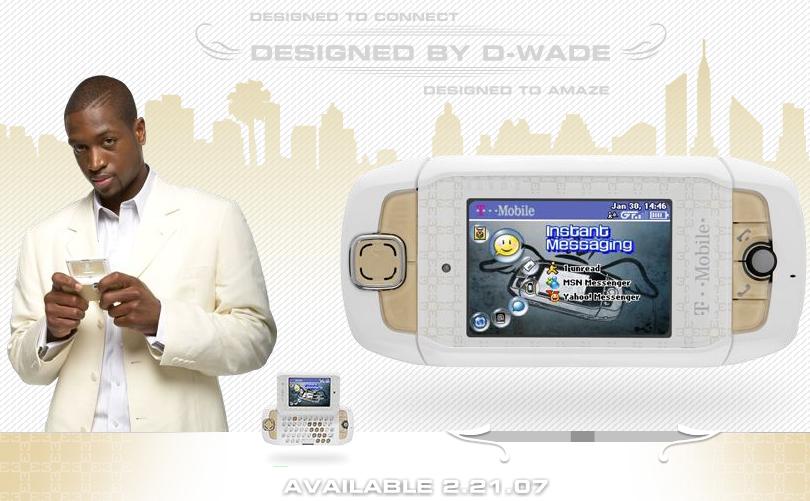
If anyone thought the Dwayne Wade Sidekick 3 might just be a rumor (not sure how), T-Mobile has confirmed officially the planned released of the D-Wade Limited Edition Sidekick 3. The T-Mobile Sidekick 3, D-Wade Edition, will be available February 21 for $399, or for $299 with a two-year contract, $100 more than the normal SK 3. T-Mobile is also launching one of their largest ad campaigns, with one of the largest “billboards” on the side of the Mandalay Bay Hotel (a 39 story hotel) in Las Vegas.


And of course the normal billboards are also starting to popup:

And if that wasn’t enough marketing for you, there’s also a Flash ad on sidekick.com that lets you rotate the device and see it from any angle.

thanks to xLotuSx over at the hiptop.com forums for the pictures!

Interview with Dwayne Wade on his Limited Edition Sidekick 3

Friday, February 9th, 2007

Gizmodo has an exclusive interview with Dwayne Wade, asking him a couple of questions regarding the limited edition Sidekick 3 that’s coming out with his name on it. Apparently the guy is a heck of a ball player, but not so much of a tech guy. The best question?

Giz: Our readers need to know: are you a Mac or PC guy?
D.W.: Neither. I’m a Sony guy.

Add to your Google Calendar (and more) with IM

Tuesday, February 6th, 2007


The other night I was talking with a friend about how great it would be to be able to access my Google Calendar from my Sidekick in order to add and view events. We lamented about the lack of a solution even though it seems like it should be possible. Then I heard about IMified this morning. IMified describes their service as such:

Imified is an instant messenger buddy that works across all major IM networks and offers access to a growing number of web applications, as well as productivity tools like notes, reminders, and todo’s. Imified helps you get things done faster.

In short, you can send an IM to their bot and Edit or View information on your different web-based applications such as Google Calendar, Wordpress, Blogger, Backpack, etc. It just launched, so it’s totally beta at this point and bugs are expected as they work out the real-world usage. But so far it looks very promising! It’s also perfect for the Sidekick user as Instant Messaging is built into the device and always available. There are even shortcuts to save you the hassle of multiple IMs. Here are some more details on IMified:

Supported IM Clients:
- AIM
- Yahoo
- MSN
- Googletalk/Jabber

Supported Services:
- 30 Boxes
- Backpack
- Basecamp
- Blogger
- Google Calendar
- MoveableType
- Remember the Milk
- TypePad
- WordPress
- IMified Notes (for when you go over 50 notes on the Sidekick)
- IMified Reminders
- IMified Todos

We recommend checking it out now if you’re willing to put up with the bugs, or else just give them a few weeks and check them out when they’ve ironed out the initial issues.

The D-Wade Limited Edition Sidekick 3

Thursday, February 1st, 2007


dwade sidekick3dwade sidekick 3
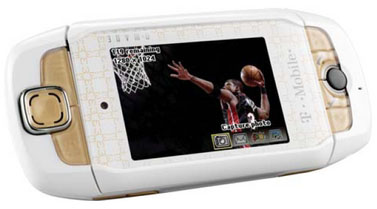
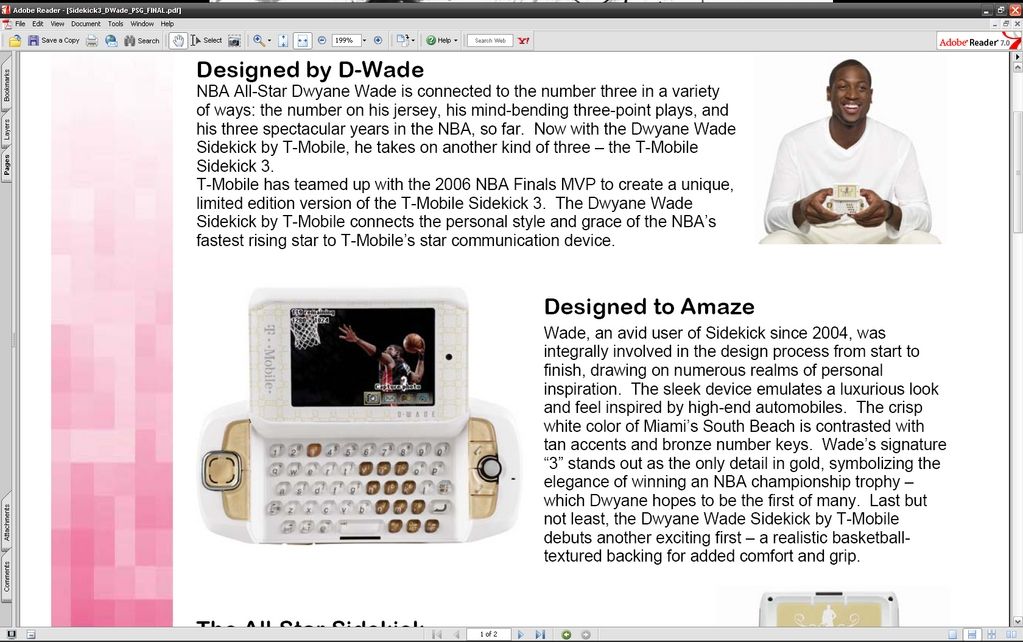
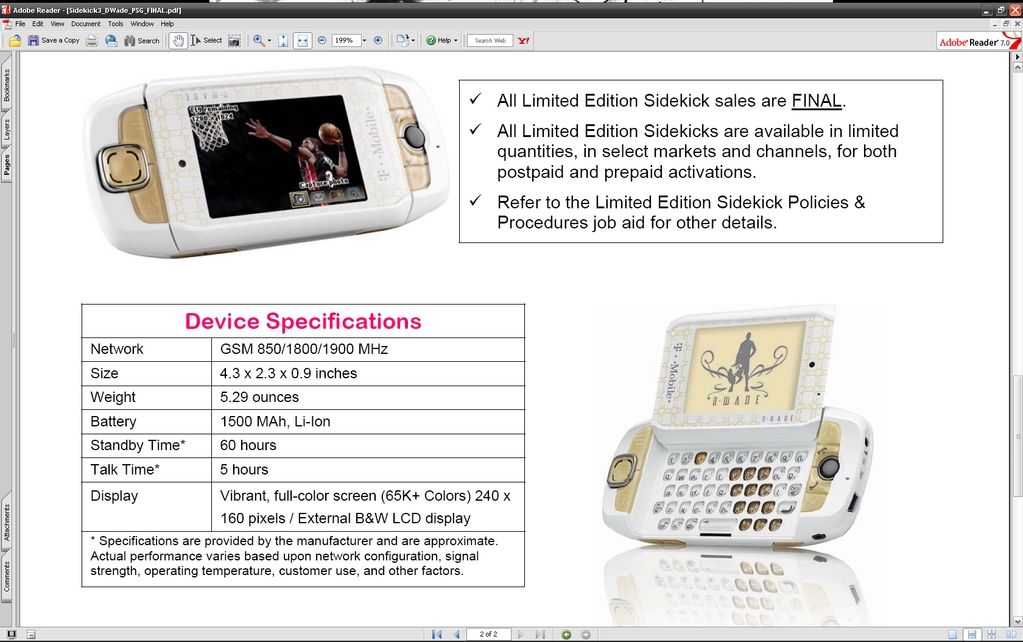
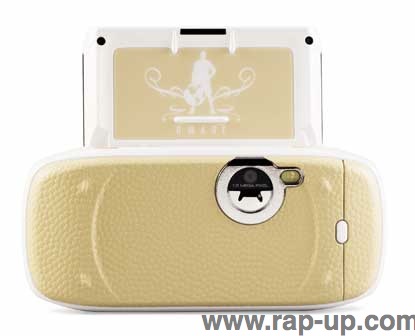
We got a link from Jahmar to the images above. Looks like screenshots of a PDF. We’d love to get our hands on the PDF for further investigation, but this looks legit. The details? A white and gold Dwayne Wade Sidekick 3 with a special “realistic basketball-textured backing for added comfort and grip”. The number 3 is also highlighted in gold since that’s D-Wade’s number. Thanks to Rap-Up.com for the additional photo below, showing off the textured back:

The text:
Designed by D-Wade
NBA All-Star Dwayne Wade is connected to the number three in a variety of ways: the number on his jersey, his mind-bending three-point plays, and his three spectacular years in the NBA, so far. Now with the Dwayne Wade Sidekick by T-Mobile, he takes on another kind of three — the T-Mobile Sidekick 3.
T-Mobile has teamed up with the 2006 NBA Finals MVP to create a unique limited edition version of the T-Mobile Sidekick 3. the Dwayne Wade Sidekick by T-Mobile connects the personal style and grace of the NBA’s fastest rising star to T-Mobile’s star communication device.

Designed to Amaze
Wade, an avid user of Sidekick since 2004, was integrally involved in the design process from start to finish, drawing on numerous realms of personal inspiration. The sleek device emulates a luxurious look and feel inspired by high-end automobiles. The crisp white colo of Miami’s South Beach is contrasted with tan accents and bronze number keys. Wade’s signature “3″ stands out as the only detail in gold, symbolizing the elegance of winning an NBA championship trophy — which Dwayne hopes to be the first of many. Last but not least, the Dwayne Wade Sidekick by T-Mobile debuts another exciting first — a realistic basketball textured backing for added comfort and grip.

original forum post

iPhone, a Sidekick 3 killer?

Tuesday, January 9th, 2007


With Apple’s recent announcement of the iPhone (way too many details available on your favorite gadget sites), a lot of people are wondering, “Is it worth jumping from the Sidekick to the iPhone?” Of course this boils down to a personal preference for everyone, but there are a few things that are making us want to stick with the Sidekick 3.

- SIZE! We were originally told the iPhone was 6″ long. The spec on Apple’s page say that is not so. Here is an updated size comparison:


- A keyboard. You can’t walk down the street typing without looking on a virtual keyboard with no tactile feedback. There is a need for input, no arguing that, and with “smart devices” a large percentage of the input is text. Ipod style interfaces (touchscreens, wheels, etc) are great for navigating data, but not for inputting.

- Removable battery. We like knowing that a battery can be replaced without having to replace an entire unit or take it in for service.

- The user interface. Danger excels as far as a user interface. It’s very quick and easy to pickup and once you’re used to it, it becomes second nature to fly around the OS.

- The “Flip” C’mon, you know it’s just cool.

Any other thoughts or comparisons? Drop em in the comments below.

Monaco Sidekick 3 Cradle

Monday, January 8th, 2007


When we heard there was a cradle for the Sidekick 3 available from Monaco Wireless, so we figured we’d give it a try. Like many people, our first thought was “Aren’t these for handhelds that can’t sync wirelessly?” and we figured it seemed a little silly. But then we actually got it, and it turns out it’s quite convenient.

The Sidekick 3 cradle is not really geared towards syncing data even though there is a USB cable for connecting to your computer to transfer mp3s and themes. It’s more about charging your Sidekick 3 and/or an extra battery. The Sidekick obviously sits in the cradle as expected, and there’s a convenient spot for charging a battery behind it. So while you’re out running around all day, draining your battery sending IMs to all the ladies, you can be charging your second battery so it’s ready to go when it’s time to go out for the night. And yes, you can charge the Sidekick and an extra battery at the same time thanks to design of the cradle.

One other nice feature about the cradle is the angle that it’s tilted at. Instead of letting your Sidekick sit flat on your desk and having to pick it up everytime you want to check something, the cradle tilts it at a comfortable viewing angle while it charges. Great for those of us that work desk jobs and want to keep an eye on incoming messages but still look like we’re working. You can also flip the screen open while the Sidekick is in the cradle for quick access to the keyboard. The only buttons you can’t get to are the power and volume buttons on the bottom.

There was only one thing that we didn’t care much for on the Sidekick 3 cradle. There’s a small LED light on the front that indicates the charging, which would be great. However, if you don’t have an extra Sidekick battery in, it alternates flashing red and green, which can be a bit distracting. We asked about this and were told it was by design because there was no other way to determine if a battery was charging if the Sidekick 3 was in the cradle. With a battery in the dock, it should stay a solid red. Like most people, we’ll be keeping the battery in the cradle until it’s needed to avoid the flashing.

If you’re looking for one of these Sidekick 3 cradles, Wireless Ground has them for sale in their online store.

T-Mobile sets up Sidekick wiki

Friday, December 15th, 2006

It looks like T-Mobile has taken a brave step and setup a Sidekick wiki. Things are a little slow moving so far, but as with all wikis, if the users want to create it, it will grow. Is a wiki really needed, or do the forums [hiptop.com (official) and hiptop3.com (unofficial)] and websites already out there cover all the necessary bases for the Sidekick? Regardless, it is nice and refreshing to see T-Mobile stepping up and providing something like this for free to their users.

T-Mobile Email Spam Cleaner

Tuesday, November 28th, 2006


Anyone that has an @tmail.com more than likely has received some spam (or else you’re very lucky). With the Sidekicks there is currently no support for filtering so most of the time it’s just a daily delete of spam. There weren’t many solutions to this problem currently other than “put up with it” or “tell T-Mobile to change your email address”. But now, thanks to Troy Phillips there is a new fix to the spam epidemic on the Sidekick.

Troy has written an application that basically logs into your TMail account and filters the email for you based on a few pre-set rules, a whitelist (email addresses to always accept from), and a blacklist (email addresses to reject). It won’t wipe anything out completely, it will just drop it in the Trash where you can periodically go in and check to see if anything accidentally got tagged as spam. It’s a bit of a hack, and might not be something for the “non-techie” Sidekick users, but at least it’s something while we wait for Danger to implement spam filtering.

More info and download at http://sidekick.troyphillips.com/

Sidekick 3 Officially Launching in the UK

Tuesday, November 21st, 2006

Up until today, we only had a rumor, but now there has been an official press release from T-Mobile UK confirming the launch of the Sidekick 3! Here’s the typical info from the press release:

Today T-Mobile announces the arrival of the Sidekick 3, the ultimate communication gadget and exclusive lifestyle accessory – making it even easier to stay in touch on-the-move.

Following the huge success, and popularity with high-profile celebrities, of the Sidekick II last year, T-Mobile is bringing the eagerly anticipated Sidekick 3 to the UK for people who are fully engaged in their social universe and who aren’t afraid of standing out from the crowd.

The Sidekick 3 is the latest handset to offer simple, open Internet access through T-Mobile’s web’n’walk service - enabling you to surf the internet in the same way as you could on your PC. With an intuitive and distinctive trackball, it makes navigating through the menu of the device or web browsing, effortless.

Staying in touch with friends or work mates has never been easier than with the Sidekick 3 - providing a one-stop-shop for organising your social calendar. With phone, email and instant messenger functions available at the touch of a button, the Sidekick 3 makes messaging quick and simple to use whilst on the move. The device has a full QWERTY keypad that makes typing faster and more accurate – perfect for staying in touch via text as well as by voice.

The Sidekick 3 also boasts a large colour screen, which is ideal for playing games, viewing photos or web-pages. The trademark Sidekick screen swivels open to be used like a mini laptop or used closed as a gaming device, phone or camera, depending on how you wish to use it.

For the first time, the Sidekick brand now offers a built-in MP3 player within the handset.

The built-in 1.3 mega-pixel digital camera is ideal for capturing and sharing special moments. Within seconds of taking a picture, each image is stored online in a back-up gallery, enabling you to send pictures to friends and loved ones or save them to your PC and print them.

On top of all this, the Sidekick 3 is the ideal personal assistant – with calendar, notes and ‘To Do’ list easily updated and always with you, helping you stay on top of your hectic schedule. The Sidekick 3 boasts an internal memory of 64MB Flash ROM and an external MiniSD card slot (with a 64MB Mini SD card included).

Phil Chapman, T-Mobile UK’s Marketing Director, said, “The Sidekick 3 is the ultimate communication device – for both social and entertainment aspects of people’s lives. This Sidekick brand has been hugely successful in the US and T-Mobile is delighted to be the first and only company to offer the Sidekick 3 in the UK.”

The Sidekick 3 will be available through T-Mobile retail stores and online at www.t-mobile.co.uk from December 2006, pricing will be dependent on price plan.