We’ve been hoping for an official Twitter application for the Sidekick for a long time now. Those of us with developer keys have enjoyed different Twitter applications on our Sidekicks, but had to endure complaints from all our friends who were stuck with SMS and the browser for their Twitter fun. It looks like in the near future these friends won’t be complaining anymore as an official MSDanger app for the Sidekick appears to be on it’s way.
Clue #1: We’ve seen and heard rumors about an internal Twitter application at Danger that was being developed. Clue #2: Developer apps for Twitter have not made any progress towards getting into the catalog and several have been made. You would think with a service like Twitter that is growing more and more popular everyday that a cheap application for it would make it’s way into the catalog. Clue #3: Remember that screenshot from the online survey that mentioned Twitter? Clue #4: There’s a whole lot of people Twittering from an application that’s only identifying itself as “hiptop”. Several of these people are known to be Danger employees.
So, we’re almost positive you’ll be seeing a Twitter application on the Sidekick LX 2009 / Blade when it drops. We also hope that MSDanger offers a Twitter application in the catalog (or via OTAu) for those users on the older devices. It would definitely round out the social networking capabilities of the Sidekick.
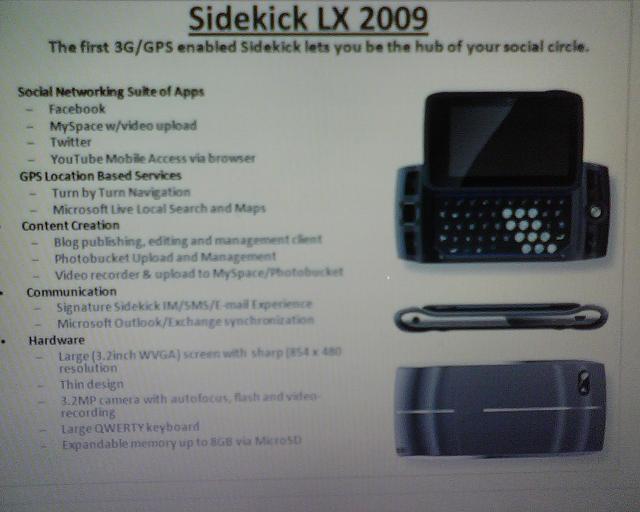
We got the above image in our inbox. The reader sending it in danielle says she was taking a survey about smart phones on QuizPoints and was presented with this one. Here are the specs it lists in the photo:
Social Networking Suite of Apps
– Facebook
– MySpace w/ video upload
– Twitter
– YouTube Mobile Access via browser
GPS Location Based Search
– Turn by Turn Navigation
– Microsoft Live Local Search and Maps
Content Creation
– Blog publishing, editing, and management client
– Photobucket Upload and Management
– Video recorder and upload to MySpace/Photobucket
Communications
– Signature Sidekick IM/SMS/E-mail Experience
– Microsoft Outlook/Exchange synchronization
Hardware
– Large (3.2 inch WVGA) screen with sharp 854×480 resolution
– Thin design
– 3.2 megapixel camera with autofocus, flash and video recording
– Large QWERTY keyboard
– Expandable memory up to 8GB via MicroSD
Everything seems to match up with what a Sidekick LX 2009 would have. It mentions 3G, which is pretty much a given at this point. The introduction of Microsoft Live Search and maps makes a lot of sense since Microsoft now owns Danger. The addition of GPS (finally!) is also a nice complement to the maps and helps the Sidekick compete a little bit with the iPhone and other location-enabled devices. But I’m sure the thing that everyone is freaking out over now is the mention of YouTube mobile access. It’s probably the #1 request for the Sidekick by the majority of the users. It doesn’t seem that out of reach since the Sidekick can play video already, it just needs a way to get it from YouTube. None of the apps are groundbreaking, but they’re things that a lot of us would agree it would be nice to have on our Sidekick.
The hardware looks about right too. A 3.2MP camera isn’t the 5mp camera we hoped for, but it is a god bump up from the 2MP camera in the Sidekick 2008 (not to mention the 1.3MP in the LX). The screen is higher resolution (too early to start working on those new themes?) and of course the familiar keyboard is still there.
Is this the Sidekick Blade that we’ve been hearing whispers about? Hard to tell. We know that “Blade” is a codename and that internally (in software) it’s know as the “m3“. The “m2” was the Sidekick 3, so one would guess the “m3” would correlate to the elusive Sidekick 4 and a “large” upgrade in device. (FWIW, the Sidekick LX was the “m2-hd”) Could MSDanger be working on two devices? It’s very possible, but we don’t have anything to back this up or refute it yet.
So is this for real? We think so. At least we think it’s specs drawn up by someone official that is testing the water with consumers to see what they think. Whether it’s what we actually see in a device in the future, I’m not 100% sure. I think it definitely sounds like the next revision of the Sidekick LX. It’s not too ambitious, but does add a few of the most requested features. Seems to be the way that T-Mobile/MSDanger like to do things with the Sidekick.
If you’re like me and tend to get lost, then maps are your best friend. If you’re also like me, it’s a pain to try to fold those maps back up and stuff them in your back pocket. Mike writes in to let us know that Google Maps will now work on your Sidekick. It’s not as great as the developer builds of a Google Maps app that were floating around, but it will do in a pinch to help you find your way. Just follow this link to use Google’s more Sidekick-friendly maps. It’s also best if you switch to (Menu->View) Full-Size layout in the browser.
Want to watch YouTube on your Sidekick? Well you’re out of luck for streaming, but you can convert the videos from YouTube to a Sidekick friendly format on your PC. Dave writes in to our comments about how to convert YouTube videos for watching on the Sidekick:
Guys please listen up closely 😉 and read carefully.
Ok, I did a little research and figured out how to Download the videos off youtube and convert them to mp4 so they can be added to your phone.
Follow closely these steps and read carefully, its fairly simple.
(Now notice, that in the end of the link theres a “&fmt=18″. That is very important and It must be there, If it isn’t then add it onto the link”
Simply place that in the Input URL.
3. Select the Output.
Click Devices, Choose MP4 Mobile Phones, and select The Standard Quality. Then just simply edit where you want the video to be downloaded to and the name you want it to have and just download it.
4. Plug in your phone through the USB connector to your pc, and open the Music Folder. Simply click and drag the video in there.
5. Unplug your USB, and check your Music Player library, and there should be a video in the videos tab. Just click and viola.
When Apple released their App Store for the iPhone most Sidekick users laughed and talked about how the Sidekick has had the Catalog (aka Download Fun) for years. We’ve been buying, downloading, and installing apps before the iPhone was even around. But as it stands now, there aren’t many phones out there that you can do this with. T-Mobile is looking to change that. They’re basically going to take the Catalog model and make it easy for developers to write applications and get them deployed to multiple devices. And when you buy an application, part of what you paid for it will go back to the developer with a revenue-sharing arrangement.
We don’t foresee anything major happening to the Sidekick platform, as it basically has the capabilities that T-Mobile is looking to implement on other phones. What we do think will change is the quality and quantity of applications and games available in the Catalog. With developers programming apps for multiple devices they will be motivated to make them Sidekick compatible as they wil make more money the more devices their application can be purchased on. T-Mobile is also opening things up for anyone to get in on the action. So you won’t have to be some big software firm that’s partnered with T-Mobile. You can be just some guy sitting on your couch writing programs.
Another interesting thing is that T-Mobile will be doing a revenue-sharing model with the developer that’s based on the amount of bandwidth used. With T-Mobile launching their 3G network, we should start seeing more streaming audio and video in the future. Chances are we won’t see any of this streaming (except perhaps low quality audio) on the current Sidekick models as the EDGE network can’t handle it, but we would be very surprised if the next generation Sidekicks don’t have support for it along with 3G capabilities. And no, we haven’t heard any details worth reporting about a Sidekick 3G is coming yet. If you’re debating on whether you should wait for it or buy a Sidekick 2008, Hiptop3.com recommends buying the Sidekick 2008.
T-Mobile hasn’t dropped an official announcement on any of this yet, but as soon as we hear more, we’ll let you know.
Hola! Looks like T-Mobile is starting to cater to the Spanish speaking users with the newest Sidekick 2008. We already posted about some of their press videos that were in Spanish, and we got the press release below that mentions the new Sidekick will have a Spanish language interface, a first for the Sidekick line. They also brag about the shells and the new shell customization website as well. Rightfully so, as everyone we’ve talked to has been impressed by the customization website. We can’t wait to see what the custom shells look like. If you got a custom shell, send it to us for the gallery!
T-MOBILE TAKES CUSTOMIZATION TO A NEW LEVEL WITH THE LATEST T-MOBILE SIDEKICK
The new T-Mobile® Sidekick® lets customers change the look of their device as often as they change their clothes
BELLEVUE, Wash. – July 30, 2008 – A picture from high school graduation, a favorite sports team logo or a vibrant splash of the hottest fall color – whatever you want to express, you can design it on the new T-Mobile® Sidekick®. Available today, T-Mobile USA, Inc. has added the latest edition to the Sidekick family providing customers with the opportunity to create shells for their Sidekick with the images, colors or designs they choose.
The new Sidekick will ship with two shells: black and metallic green. A variety of pre-designed shell patterns and colors also are readily available for customers to purchase at T-Mobile retail stores or online. Of course, for true individualization, customers can design a completely unique shell unlike any other using a dedicated online Sidekick site via SkinIt at www.sidekickshells.com. Doing so is as simple as uploading a personal photo or graphic design, or selecting your own text, shapes, icons or logos. The final design is custom-printed onto the shell, then shipped. Once the design is complete, customers can share their work of art in a public gallery that will be hosted on www.sidekick.com.
“There is perhaps nothing more important than someone’s individual style and personality. The new
T-Mobile Sidekick, with its customizable shells, lets our customers easily express that unique style directly on their phone,” says Sajal Sahay, director, product marketing, T-Mobile USA. “Providing our customers with options to stand out from the crowd and show a true expression of themselves is what makes this Sidekick such an intriguing, fun device.”
In addition to enhanced personalization, the T-Mobile Sidekick is sporting a slightly smaller, thinner and lighter design than previous Sidekicks. It also comes fully loaded with the latest Sidekick features including video capture and playback ability, so customers can record and watch spontaneous and memorable moments, whether at a football game or a music concert.
The new Sidekick also features an integrated Spanish user interface – the first for a Sidekick device. Other features include first-rate messaging with IM, text and e-mail, as well as stereo Bluetooth® for easy photo and file transfers and a 2.0 megapixel camera. The Sidekick also is equipped with customizable Web surfing and more internal memory for storage of ringtones and multimedia messages.
We’ve been waiting for months and months for this device. It’s been quite the cornucopia of rumors, codenames, and speculation. What once was thought to be the Style 2, then the Sidekick Aspen, or maybe the Sidekick Gekko, is officially here, and it’s going by the name of the Sidekick 2008. Yeah, we realize that 2008 is already half over too. We’re not sure why T-Mobile decided to go with an annual naming scheme this time, but as history shows, they can’t decide on a naming convention. Regardless, we’re here today to talk about the Sidekick 2008 *coughgekkocough*. We’re pretty impressed with a device that we had low expectations for. Sure, it’s not a major jump, but it certainly is a nice little device with all the familiar features that Danger does well. It’s a good upgrade candidate for anyone not yet carrying an LX or Slide, as it’s not a ridiculously expensive phone. That being said, let’s jump into the details.
The Bad News
Let’s get this out of the way right off the bat. The Sidekick 2008 is not 3G. It’s on the slower EDGE network like the other recent Sidekicks. Those of you still waiting for a super fast Sidekick 3G will just have to keep waiting. If that’s a deal-breaker for you, then you may not want to waste your time with the rest of this review.
Screen
One of the most important aspects of the Sidekick is the screen and its familiar flip. It’s still here. The screen on the Sidekick 2008 is the same high resolution (400×240 WQVGA) as the Sidekick LX, but it is a bit smaller in size (2.6″ instead of 3″). This actually results in crisper images and much nicer web browsing and picture viewing on the device. You don’t have as big of a picture, but for most of the things you use a Sidekick for, you won’t even notice. Plus you shave off a tiny bit of weight and size. Screen gets a thumbs up.
Keyboard & Buttons
The keyboard on the Sidekick 2008 is very similar to the Sidekick LX. However the keys are ever so slightly smaller, but typing on it is still as easy as ever. That’s one thing that no phone on the market has been able to compete with, the Sidekick’s keyboard. I was a bit concerned with the keyboard size at first, but it hasn’t been too much of an issue. It just might take some getting used to.
Weight
One of the things I noticed about the 2008 instantly was that it was significantly lighter than the other Sidekicks. As I was carrying it around I sometimes completely forgot that it was in my pocket. I broke out the scale to get some real world measurements and found that it weighed 4.8oz, the same as the new iPhone 3G. Compare this with 5.7oz for the LX, 6.4oz for the Sidekick 3, 6.49oz for the Sidekick II, and a whopping 7.0oz for a Color Sidekick. If you’re still using a Color Sidekick, it’s time to upgrade.
Shells
One of the biggest selling points of the Sidekick 2008 is shells. These simple pieces of plastic are what can turn your phone from ordinary into something flashy and fashionable. T-Mobile will be selling all sorts of standard shells, in a typical range of colors. The device we got our hands on came with a yellow-green shell (like we’ve been seeing in all the Sidekick Gekko graphics) as well as a more subtle black one. The small parts of the device that aren’t covered by the shell (the screen frame, keyboard, and buttons) are a nice simple black as well. Yes, that’s right, right out of the box all you goth kids can finally have a black Sidekick without having to customize it. T-Mobile is also going to have a site where you can create your own shells, share them with others, and buy these custom shells. The shells are going to be created by Skinit.com and we hope they’ll be as nice of quality as the shells that come with the device. We’re also eager to see what sort of shell + custom theme combos people do with their devices. Maybe if T-Mobile doesn’t have a contest, we’ll throw one. Pricing for the shells from T-Mobile is $14.99 apiece or two for $9.99 each.
Camera
The camera is not a huge jump in quality, but it’s something. It’s a new 2.0 megapixel camera and it seems to get pretty good quality photos in good light. The camera takes images at a resolution as high as 1600×1200, but does’nt have a flash like the LX. Here are a few pics we snapped with the 2008:
The camera is slightly better, but you’re still stuck recording video in postage-stamp size 176×144 pixels. It’s handy for sending a quick video message to a friend, but don’t expect to record the championship basketball game you went to with the Sidekick. We took a quick little video: Video taken with the Sidekick 2008
Operating System
The Sidekick 2008 ships with Danger OS 4.7, a slight bump up from the current OS for the Sidekick LX. The OS is virtually identical (we haven’t found any differences yet) to what is on the Sideick LX after the long-awaited video OTA update brings you to v4.6. Just like the Sidekick LX, the Sidekick 2008 also has video playback as well as recording. The Sidekick 2008 has the newer browser that has full page mode as well as a device-optimized mode for viewing web pages. You’ll want to use the full page mode if you want a more “true to original design” web browsing experience, and the device-optimized mode for stripped down and quick web browsing. Oh, and remember that annoying flying icons bug if you had a custom theme and the MySpace app installed? It’s finally fixed. A huge thank you to the developer at Danger/Microsoft that took the time to fix a tiny, yet annoying detail like this. There’s some debate over whether it’s fixed or not.
Price
We’re hearing from T-Mobile that the Sidekick 2008 isn’t going to break the bank and will be available for $149.99 with a 2 year contract. This isn’t the cheapest phone out there, but it’s definitely appealing to get the Sidekick LX features without paying several hundred dollars. The price for the phone without a contract extension will be a bit more for those that don’t want to lock into another 2 years. No official word on this price, but the leaked info from Best Buy makes us think $299.
Accessories
In the box you’ll get the typical array of accessories. The new charger is well designed, with a plug that flips out when needed. You’ll also get a stereo wired headset/mic, but we bet almost everyone will be picking up Bluetooth headsets since you can now listen to music over them with A2DP now. Two shells are included, a yellow-green one and a plain black one. Once T-Mobile gets the shells site up and running we should see the available options for shells explode.
Conclusion
I like the Sidekick Gekko. It’s not a groundbreaking phone, but it’s a nice daily-use communication device. I’ve been recommending it to friends who are still limping along with a Sidekick II, or an older device. Danger still owns the mobile device instant messaging trophy, as well as the “Best Keyboard” award. If you have any questions, please drop them in the comments below and we’ll do our best to answer them in one post in the near future. Also, we’re curious to see who’s going to pick up this phone:
[poll id=3]
If you hadn’t heard, it’s finally time for the Sidekick LX Video OTA to roll out to everyone. Over the last week or two the update has been slowly rolling out. The pioneer people that got the users should also receive a new update that brings them up to the latest version. So yes, it’s finally here guys. It’s rolling out randomly, not based on location at all. Good luck trying to guess when you’ll get the OTA. Just sit tight and we’ll all be enjoying the new video and browser goodness before too long.
Before you get all excited, chances are this is just someone with Photoshop that got told “Hey, I need a phone that looks like it has GPS on it” by their boss, so they whipped something up. But we can’t help wonder why the model in the photo accompanying this article is holding the Sidekick 3 so oddly. Then again she is in a mall, and why would you need GPS (let alone being to get a signal) when you’re looking for a new pair of shoes? Regardless, there have been bits and pieces about GPS getting incorporated into a future Sidekick in some way for awhile. Remember that old job posting? From a technical standpoint it would probably be possible to interface a Sidekick with a Bluetooth GPS as it stands now, it would just be a matter of getting a mapping solution on the Sidekick that’s powerful enough. Maybe with Apple’s new iPhone 3G, Danger Microsoft will have some motivation to upgrade some of the hardware capabilities of the Sidekick to keep up with the location-aware mobile computing that is bound to happen in the very near future.
So everyone has seen the video recording capabilities of the Sidekick LX, but what about video playback? We converted a video into .3gp and tossed it on the Sidekick to see how it looked. Surprisingly it turned out pretty good! It’s not unreasonable to think that people could be watching TV shows and music videos on their Sidekick. We won’t say movies are a possibility because we haven’t done any testing to see just how much of an impact this has on battery life. Anyways, enough talk, here’s the video: