
Archive for the 'Applications' Category

Sidekick LX OTA is official

Friday, June 6th, 2008

We’ve been saying it for months and months, but T-Mobile has finally put out the official confirmation in their press release yesterday. The Sidekick LX is getting a video OTA. In case you missed it in the press release about the Tony Hawk Limited Edition Sidekick LX, here’s the snippet:

This summer, all Sidekick LX customers will receive an over-the-air update that includes the new functionality that is integrated in the T-Mobile Sidekick LX Tony Hawk Edition, such as video recording and playback ability, an alarm clock, stereo Bluetooth support, and Bluetooth file transfer support.

Rumors flying around are that it’s going to drop on July 15th, which makes sense.

Sidekick LX Video details

Friday, May 30th, 2008

Wondering what the Sidekick will be able to record and playback as far as video is concerned? We’ll we’ve got the 411 straight from the manual:

Note! The SonicBOOM Media Player will play 3GP and MP4 (simple profile) video files, and MP3, WAV, MIDI, WMA, AAC (MP4), XMF, RMF, AIFC, IMY, AMR music files. It will not play RAM, M4P, FLAC, RA, AVI, or any other file that is not listed above.

Sorry gang, no YouTube support this time around. Maybe when a 3G device comes out in the distant future.

As for the format the Camera will record videos in, it looks like that’s going to be .3gp files using the H.263 video codec. Should be nice and small for sending to your friends.

Manual pages from the Sidekick Gekko

Thursday, May 22nd, 2008

We found the following images in our mailbox, already watermarked for us. These come straight from the manual for what we’re all assuming will be called the Sidekick Gekko (or Aspen). For your viewing pleasure:

An illustration of the Sidekick Gekko, nothing too surprising.
Sidekick Gekko

About the Camera
You can take photos with the device’s 2.0 megapixel camera, then save them in .JPG format to two locations:
– your device’s built-in memory (called Device Albume on the screen), or
– the microSD memory card you’ve inserted into your device (called Memory Card Album on the screen)

You can take videos (.3GP format) and store them on the microSD memory card. Note: Videos cannot be saved to the Device Album.

You can store up to 1.75M of photos on your device, and store videos and more photos on your microSD card. The number of photos you can store will depend on the capacity of the card and the size of the photos: 1600×1200 (largest), 1280×1024, 640×480, or 320×240 (smallest).

You can aso save one or more photo or video email attachments to an album. Read more in Saving Photo Attachments to a Photo Album.
Sidekick Gekko Camera

Replaceable Shells
You can customize your device with replaceable shells!
Sidekick Shells

Capture a Video!
Sidekick Capture Video

All in all no huge suprises, but some pretty concrete confirmation of what we’ve already reported on.

Sidekick LX (and Slide?) Video confirmed by T-Mobile

Thursday, May 15th, 2008
Sidekick LX Pictures and Videos

For all those that were doubting us when we said that video was coming to the Sidekick LX via an OTA, we present you with a page straight from T-Mobile.com. The text reads:

Viewing available memory for pictures and videos
To view available memory for pictures and videos, perform the following steps:
1. At the Jump screen, roll to and select Camera.
2. The available space for new pictures appears in the upper left-hand corner of the screen.

The original page for the Sidekick LX can be found here (if they haven’t pulled it yet). There’s also the same page for the Sidekick Slide, although we haven’t heard any details on an OTA for you Slide owners yet and there’s also this page which says: “The Sidekick Slide does not support sending video messages.” So we’re going to stick with saying to expect the video OTA for the LX, but not for the Slide. Sorry Sliders.

Pictures and videos man. Pictures AND videos.

-Thanks to Ryan for catching this.

Video on the Sidekick LX

Friday, May 2nd, 2008

We’ve been saying it for months and months, but now we’ve actually got some picture proof for you guys. Yes, the Sidekick LX is getting video, as evidenced by the screenshots above. We’re still trying to figure out details on what exactly the Sidekick will support as far as video is concerned. But yes, you will be able to capture and playback video on the Sidekick LX. I’m sure the question on everyone’s mind is “Will I be able to watch YouTube videos?” and as of now we don’t have a firm answer yet. Rumor has it that the H.264 codec will be supported, and YouTube started encoding videos in H.264 for Apple awhile back. So there may be some sort of workaround, but as far as a dedicated YouTube app for the Sidekick LX, we haven’t heard anything yet. We’ve also heard that it might be H.263 instead of H.264. We’ll let you know as soon as we nail it down so you can start converting your videos to be ready.

But for all you Sidekick LX users, look for an OTA coming very soon. And if you’ve been holding off on getting a Sidekick LX because of the lack of video support, it’s time to spend that money you’ve been saving. There was also a recent price drop in the device yesterday, so take advantage of that.

Nintendo Emulator on the Sidekick

Saturday, April 12th, 2008

A lot of the tech blogs have been buzzing about the Nintendo emulator that runs on the Sidekick. Here’s the real scoop. Yes, it exists and you can play Nintendo games on the Sidekick 3/LX/Slide as evidenced by the video above. It’s slow and more of a proof-of-concept sort of thing rather than a truly viable gaming application. It was basically taking an existing Java NES emulator (Vampant) and wrapping it for loading on the Sidekick since the Sidekick OS supports java. No, it is not going to make it into catalog unless T-Mobile gets real friendly with Nintendo and the license holders of all the roms that you would want to load. The application is a developer app that is only available to Sidekick developers. So basically if you don’t know how to write java, you’ll never get to load it on your Sidekick. When asked for comment, the developer simply stated “HOLLA!”

MySpace app pulled from catalog

Tuesday, December 4th, 2007

Sidekick MySpace App
Looks like Danger/T-Mobile have pulled the famous MySpace app from their catalog. Is this perhaps so they can fix the buggy application that has everyone using the browser still? There have been numerous posts on poweredbydanger.com with people complaining about the poor performance and bugs as well as necessary workarounds to fix conflicts with themes downloaded from sk3themes.com, sklxthemes.com, and skslidethemes.com. Up until the app was pulled, you were able to download and install it for free and continue using it until the end of December. After that you would be charged a recurring monthly fee of $1.99. Did Danger/TMobile just treat this freebie as a beta test for an app that wasn’t quite ready for the market but needed to be pushed out in order to compete with the Helio Ocean on paper? Here’s hoping they squash the bugs and deliver a 100% app by the end of the month.

UPDATE: The MySpace App is back in the catalog. No idea why it disappeared briefly.

Weather Underground and Terminal

Sunday, December 2nd, 2007

Two of the most loved applications by die-hard sidekickers have finally made it into the Sidekick LX catalog.
Weather Underground
Weather Underground for the Sidekick LX
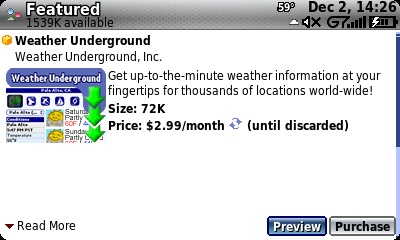
Weather Underground is an application that gives you current weather conditions, radar images, and forecasts. Very handy for knowing whether or not you should grab that umbrella on the way out the door. The only downside to Weather Underground is that it is a recurring fee, i.e. you’ll be charged every month that you have it installed.
Terminal Client
Terminal Client for the Sidekick LX
Terminal Client (previously known as Terminal Monkey) seems to be an application that you either love and use constantly or you have no use for it. It’s basically a terminal client that allows you to connect via telnet or ssh to a server. This app combined with screen allows for all sorts of fun stuff. As an example, I use it to login to my server at home and turn my lights on and off. It’s also handy for people that want to chat on IRC. For those that have no idea what I’m talking about, chances are you don’t need Terminal and should save the $9.99.

thanks to silversidekick for pointing these out

Sidekick LX OTA Coming Soon?

Friday, October 26th, 2007

It sounds as if Danger is preparing the first OTA for the Sidekick LX. They are calling the update an “Email Refresh for Sidekick LX Users” and it appears to update your Email application to use tabs, similar to the recently released Myspace application.

Judging from the Screenshots, this looks to make each service you use into it’s own tab. So if you have say your T-Mail account and a Gmail account, there will be a T-Mail and Gmail application to keep them separated. It also looks pretty nice.

No release date information has been specified, and it’s unclear if there will be other fixes or if this just replaces the EMail application.

Read more about the new “Email Messaging” application in the Manual Here and read about the OTA Here

MySpace Application Available for Sidekick 3

Saturday, October 20th, 2007

This is a delayed post, but for those of you under rocks (never open your catalog application.) the coveted MySpace Application is available for the Sidekick 3.

Same as the Sidekick iD, it’s free until January and then will cost 1.99/month there after.

Since it’s the same as the iD version, if you want to know more visit the old story Here