New Sidekick 4G Videos from T-Mobile
Tuesday, March 29th, 2011A couple more videos about the Sidekick 4G from T-Mobile:

A couple more videos about the Sidekick 4G from T-Mobile:
Danger Developers are receiving an email from Microsoft/Danger informing them that the sales of “one-time donload content” will be discontinued as of March 2nd. Yes, as in tomorrow. So if there was ever a theme, ringtone, or app you wanted to purchase from the Sidekick catalog, you better grab it today.
Free stuff and subscription based apps will remain in the catalog. After tomorrow it sounds like the only way to get ringtones or themes will be via the free sites: Sidekick-Themes and Skringers.
Looks like maybe the Sidekick is going to get support for more document types. In a press release put out today from Iseemedia, their President is quoted as saying, “We are excited to be working with Remoba to deliver a complete PC experience on T-Mobile sidekick handsets.” He’s talking about the announcement of T-Mobile’s deployment of their product, iseedocs.
What is iseedocs? Their webpage says: “iseedocs enables mobile users to instantly view and interact with all common email attachments – regardless of file size – as if they were sitting at their desks.” So in short, it will be a way to view all sorts of document types that aren’t natively supported by the Sidekick as long as you have network connectivity. What will it support? Their site says they can handle everything from Office dovuments to PDF, audio, and video. A lot of documents are directly supported on the Sidekick, but iseedocs will take the responsibility off the Sidekick OS and allow for future document types without having to update the Sidekick.
Here’s the full press release:
iseedocs(TM) Goes Live on Major U.S. Carrier Network with Remoba Email Service
TORONTO and SANTA CLARA, CA, Jan. 5 /CNW/ – iseemedia Inc. (TSX-V: IEE), a leading provider of technology and services that allow mobile phones to be experienced like desktop devices today announced that it has begun commercial deployment of iseedocs(TM) on the T-Mobile Network in the U.S. with Remoba. iseedocs enables instant attachment viewing and navigation without having to download content. Handsets provide access to enterprise email, calendar and contacts. The combined offering is now being rolled out to T-Mobile customers as a choice download with affordable email data plans.
“As more people travel and work from multiple locations, mobile phones must perform more complex tasks and access email with sizeable attachments,” said Anthony DeCristofaro, President and CEO, iseemedia. “iseedocs is the ideal solution to perform this task on mobile phones. We are excited to be working with Remoba to deliver a complete PC experience on T-Mobile sidekick handsets.”
Unlike most email attachment handlers, iseedocs delivers a document index which is also the document management system. All pages, images and graphs are accessible on demand. Unlike other attachment viewers, iseedocs does not download the document to the mobile device, but streams pages as they are requested. The user can also zoom and pan the document, providing a higher degree of information than is normally available on mobile devices.
Using a Smart Adaptation Engine, iseedocs maintains virtually all document formatting and content. So if a chart embedded in the Word document is too small to see, the user can zoom in to view more detail. If a 30-page document is being viewed, and the reader needs to view page 21, they can access the page directly through a table of contents or page thumbnail navigation.
“We provide the Smartphone alternative for consumers and business users without the costly data plans, proprietary devices and IT infrastructure modifications,” said Guru Thalapaneni, President and CEO of Remoba. “iseemedia serves as the perfect complement so users can readily manage their everyday activities directly from their mobile phones. More importantly, we help network operators to control their bandwidth costs while allowing them to offer new services on mass market devices. We look forward to expanding our efforts with T-Mobile as we make steady progress with this launch.”
The mobile phone application allows users to access business on their mobile phones. It can securely access email stored on servers and perform almost all the functions through the mobile phone just the way one would do from a home or office computer. The application can be downloaded to the phone like any ring tone or game, and setup by entering username and password.
About Remoba
Remoba is a leading developer of high-value, and affordable mobile phone software that makes “Every Phone a Smart Phone”. Remoba provides Wireless Access to Email, Contacts, and Calendar from the Desktop, Corporate Server, or Hosted Server on most Cell Phones. Remoba is based in Hayward, CA with a development center in Bangalore, India. For more information please visit www.remoba.com.
About iseemedia
iseemedia Inc. is a software development company focused on the commercialization of a Service Delivery Platform (iseemail(TM)) for delivering Blackberry-like email services to the mass market and an advanced Content Delivery Platform (iseedocs(TM)) for rich media adaptation and extremely cost-efficient delivery to mobile devices. The Company maintains a broad portfolio of issued and pending patents that support authoring, streaming and interactive viewing. iseemedia is publicly traded on the TSX Venture Exchange (Symbol: IEE).
Via press release
Thanks Mike!

T-Mobile has dropped the price of Sidekick Sync down to $2.99 a month. If you already bought Sidekick Sync you should go into the Catalog and upgrade in order to get the lower monthly price.
What is Sidekick Sync?
Sidekick Sync provides secure access to your Exchange Active Sync (Outlook) e-mail. calendar events, corporate directory and contacts on your Sidekick LX 2009. Read, reply and forward your e-mail, and accept calendar invitations just as you would on your PC.

Remember how back in October you had a little bit of trouble with your Sidekick? Well T-Mobile continues to do their best to make it up to the people that stuck with the Sidekick through those troubling times. You probably got a free month of data service for October, several of you got $100 $50 cards that you can use to pay your bill or upgrade your phone, and now T-Mobile has put some free stuff in the Catalog to show their appreciation of you as a customer.
If you jump into the Download Catalog (which has thankfully returned), there’s a section at the bottom called “Customer Appreciation”. We haven’t checked the other devices, but on the Sidekick LX 2009 it contains Twitter, 2010 NFL, Animated Screensavers, Crossword HQ packs, Prank Box packs, Sudoku HQ packs, a couple of Backgrounds and Themes, and a handful of Sound FXs. If you pick up Twitter, be sure to follow us: @hiptop3 and @skringers
T-Mobile is sending out emails to customers that bought Intellisync letting them know that it is back up and running:
Dear Sidekick Customer,
We show you previously purchased the Intellisync application. We are happy to notify you that this application can once again connect to your Sidekick account to sync your Sidekick Address Book, Calendar and To Do data with Microsoft Outlook.
Good news! As we posted on our Twitter account (@hiptop3), the Download Catalog came back online this weekend. There was much rejoicing.
Also, we heard from T-Mobile directly and they were very happy I’m sure to be announcing that Sidekicks were no longer “Temporarily Out Of Stock” and were up for sale on T-Mobile.com again! You can snag a Sidekick LX 2009 for $149.99 or a Sidekick 2008 for $49.99
. And if that’s not cheap enough, you can even get an open box Sidekick 2008 for $34.99
. (All with 2 year contracts of course)

Life as a Sidekick user is starting to return to normal as T-Mobile/Microsoft/Danger slowly announce each piece of data that is restorable as they make progress. We’ve gotten back Address Books, Calendars, To Do Lists, Notes, and most recently Photos. I know a lot of people are still waiting on Bookmarks and I imagine that will be next in line. However one of the hallmarks of the Sidekick is still missing and we haven’t heard any word on when it will return.
I’m of course talking about the Download Catalog, aka the first App Store. The Catalog has been down for over a month and this sucks both for Sidekick users as well as Sidekick Developers. I’m sure T-Mobile is feeling the hurt too as a large source of their income from Sidekick users comes from selling applications, ringtones and themes.
While there are no other ways to get applications (save having a developer key), it is possible to get ringtones and themes while the catalog is down from unofficial sites. Themes for most Sidekicks can be found at Sidekick Themes and if you have a Sidekick LX 2009 you can get free ringtones at Skringers.com.
UPDATE (2009-11-11): We’re hearing through the grapevine that the Download Catalog may be up by Saturday if things go well! Keep your fingers crossed.

Are you on Twitter? Follow us! @hiptop3
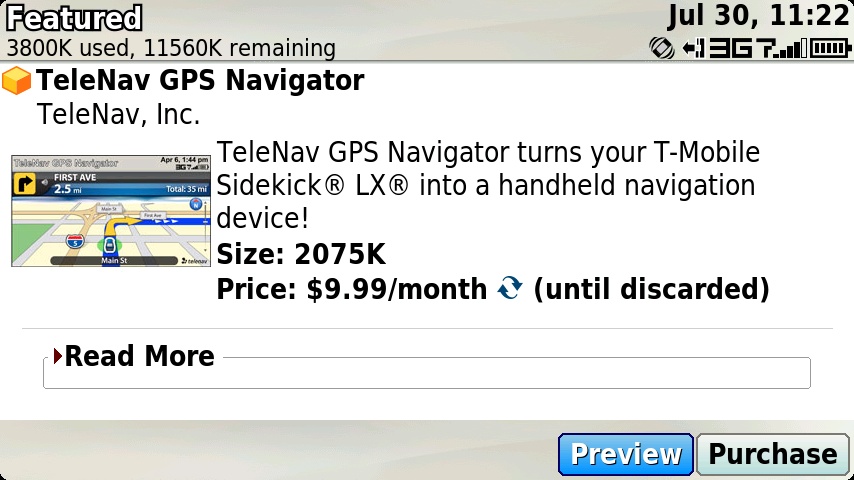
You’ve probably already noticed this if you’ve been in the Download Catalog lately, but there’s a new GPS app out there in addition to Microsoft Live Bing. Everyone is always clamoring for turn-by-turn navigation on their devices so they can use them while they drive. TeleNav delivered a solution for the Sidekick LX 2009 in the form of “TeleNav GPS Navigator”. For $9.99 a month you’ll get “voice-guided and onscreen turn-by-turn driving directions”, automatic re-routing, 3D maps, traffic alerts, business information, weather, and even speech recognition so you don’t have to type while driving! Most of the time when I see an application with a recurring fee, I’m instantly turned off by it. But if I was driving regularly, I imagine this app would be incredibly useful! If you’re using this app, let us know how it is in the comments.
Here are some screenshots from the catalog:


Got something to post? admin@hiptop3.com
You are currently browsing the archives for the Applications category.