Click here for cheap no-contract Sidekicks and accessories!

Archive for the 'Video' Category

Sidekick 2009 Camera

Tuesday, February 24th, 2009
Sidekick 2009 with Hiptop Cat

Alright gang, we’ve got some Sidekick 2009 info for you. Here’s the details on the camera that we’ve been able to find out so far.
* It will take photos up to a resolution of 2038 x 1536, meaning 3.2 megapixels.
* There’s a flash, so those grainy shot-in-the-dark photos will be possible.
* There is a new auto-focus feature, so you shouldn’t have to use the jewelry loupe/magnifying glass trick to get up close shots of things.
* Video recording sounds like it’s set to 15 frames per second for now. But might be possible for 30fps.
* You will be able to upload directly to MySpace, Photobucket, and YouTube
* It will support geotagging

All pretty much straight-forward information. For those that don’t know what geotagging is, it means that you can embed location information in the photos you take. So if you take a photo at your friends house and then upload it to a site that supports the geotagging info, it’ll show up on a map at the location you took it. This uses the GPS that’s coming in the Sidekick 2009. It’s all pretty good info, and about what we’d expect from a Sidekick camera.

Sidekick LX 2009

Wednesday, January 28th, 2009

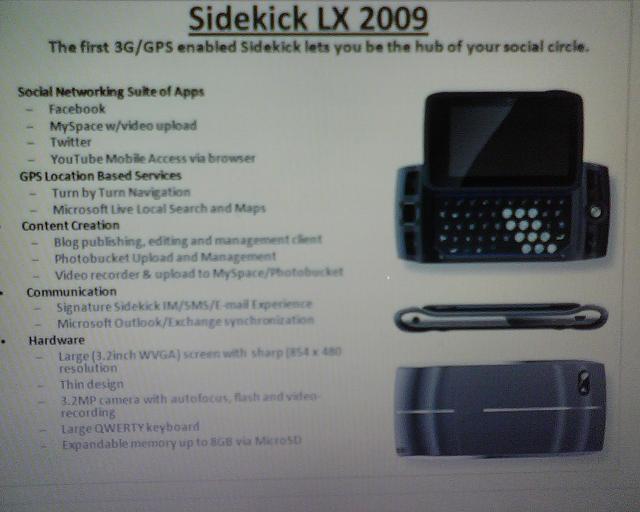
We got the above image in our inbox. The reader sending it in danielle says she was taking a survey about smart phones on QuizPoints and was presented with this one. Here are the specs it lists in the photo:

Social Networking Suite of Apps
- Facebook
- MySpace w/ video upload
- Twitter
- YouTube Mobile Access via browser

GPS Location Based Search
- Turn by Turn Navigation
- Microsoft Live Local Search and Maps

Content Creation
- Blog publishing, editing, and management client
- Photobucket Upload and Management
- Video recorder and upload to MySpace/Photobucket

Communications
- Signature Sidekick IM/SMS/E-mail Experience
- Microsoft Outlook/Exchange synchronization

Hardware
- Large (3.2 inch WVGA) screen with sharp 854×480 resolution
- Thin design
- 3.2 megapixel camera with autofocus, flash and video recording
- Large QWERTY keyboard
- Expandable memory up to 8GB via MicroSD

Everything seems to match up with what a Sidekick LX 2009 would have. It mentions 3G, which is pretty much a given at this point. The introduction of Microsoft Live Search and maps makes a lot of sense since Microsoft now owns Danger. The addition of GPS (finally!) is also a nice complement to the maps and helps the Sidekick compete a little bit with the iPhone and other location-enabled devices. But I’m sure the thing that everyone is freaking out over now is the mention of YouTube mobile access. It’s probably the #1 request for the Sidekick by the majority of the users. It doesn’t seem that out of reach since the Sidekick can play video already, it just needs a way to get it from YouTube. None of the apps are groundbreaking, but they’re things that a lot of us would agree it would be nice to have on our Sidekick.

The hardware looks about right too. A 3.2MP camera isn’t the 5mp camera we hoped for, but it is a god bump up from the 2MP camera in the Sidekick 2008 (not to mention the 1.3MP in the LX). The screen is higher resolution (too early to start working on those new themes?) and of course the familiar keyboard is still there.

Is this the Sidekick Blade that we’ve been hearing whispers about? Hard to tell. We know that “Blade” is a codename and that internally (in software) it’s know as the “m3“. The “m2″ was the Sidekick 3, so one would guess the “m3″ would correlate to the elusive Sidekick 4 and a “large” upgrade in device. (FWIW, the Sidekick LX was the “m2-hd”) Could MSDanger be working on two devices? It’s very possible, but we don’t have anything to back this up or refute it yet.

So is this for real? We think so. At least we think it’s specs drawn up by someone official that is testing the water with consumers to see what they think. Whether it’s what we actually see in a device in the future, I’m not 100% sure. I think it definitely sounds like the next revision of the Sidekick LX. It’s not too ambitious, but does add a few of the most requested features. Seems to be the way that T-Mobile/MSDanger like to do things with the Sidekick.


A Quick Trip Down Memory Lane

Monday, January 5th, 2009

This one is dedicated to all the Black and White Hiptoppers. Aaron (one of the original Hiptop pranksters) fished out some old stuff from back in the day and we thought we’d share it with you. First up is a smoking hot ad for the Hiptop that makes me want to go out and buy 2 Black and White Hiptops even now.

A man known for his great jokes, Aaron once fooled a lot of people into thinking he had the much-coveted color hiptop before anyone even knew what it looked like:


image via Flickr

And noone can forget when he got the original OTA:

And we leave you with your “Fun Fact of the Day” – Aaron was the originator of the Cat Remote rumor that kind of launched Hiptop3.com

Snoop Dogg Sidekick II Commercial

Sunday, December 28th, 2008

Here’s a blast from the past. It’s the old Snoop Dogg Sidekick II commercial. It reminds me of a terrible joke:
Q: What does Snoop use to wash his clothes?
A: Bleeeyaaach

You can check out some other Sidekick commercials, including the old Johnny Chase ones in our previous post on Sidekick commercials.

Building the Danger Hiptop

Sunday, December 28th, 2008

Stanford University has posted an interesting video of a talk given by Joe Britt, one of the founding members of Danger. He talks about the design of the Sidekick/Hiptop and how it became what it is today. It’s not a short watch since it clocks in at over an hour, but definitely interesting to gadget freaks that like to learn about this stuff. Here’s the info on the video from Stanford:

May 25, 2007 lecture by Joe Britt for the Stanford University Human-Computer Interaction Seminar (CS 547). When mobile phones became within the financial grasp of the everyman, the value was easily understood. Telephone-accessible “content” could now be enjoyed from a car, while waiting in line, or from a table at a restaurant. In this talk, Joe discusses several key aspects of the platform’s development and shares the design philosophy applied by the team. Strong belief in the importance of hardware/software integration and an organic, iterative design process were critical for success. Lessons learned at companies like Apple, General Magic, and WebTV provided the team with a context for partitioning a complex problem across hardware, software, and a powerful back-end service.

How to convert YouTube Videos for the Sidekick

Thursday, November 6th, 2008

Since most people have a Sidekick that plays video these days, one of the most asked questions is how to get video converted so you can actually watch it on the Sidekick, especially YouTube videos. CubanitaStylez (the same one that puts together those awesome themes) has recorded a video walking you through the steps to download a YouTube video to the Sidekick. You’ll need to use a website to download from YouTube and the video encoding program eRightSoft SUPER. Here’s the video walking you through it:

This should work for converting videos for the Sidekick LX, Sidekick Tony Hawk, and Sidekick 2008. For more details and other handy videos, check out cubanitastylez.blogspot.com

Evil Video Crashes the Sidekick

Thursday, August 28th, 2008

No, this isn’t some new fancy device that’s going to kill the Sidekick. It’s a corrupted 3gp video file that has the potential to hard reset a Sidekick with very little user interaction that’s out in the wild. That’s right, hard reset, as in wipe out all of your data and force you to redownload it from Danger’s servers. Luckily with the way the Sidekick is designed you won’t lose anything, but it’s still an annoyance to have to wait for all your email, settings, etc to download. It’s also a really nasty trick to play on someone you don’t like.

This was first posted in the PBD forums under a thread titled “Virus In Email?! Important!! Read!!”. I know, my first thought too was, “yeah right, Sidekicks don’t get viruses”. Technically this isn’t a virus, and it isn’t even malicious in intent. It looks like it’s just a bug with the way the email application handles a corrupted video. Needless to say though, it is a serious bug that Danger will hopefully fix in an OTA quickly. This currently affects the new Sidekick 2008, as well as Sidekick LXs with the video OTA.

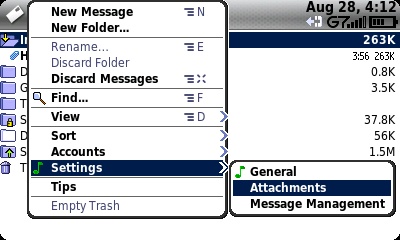
Want to protect yourself from this sort of crash? In your Email, go under Menu->Settings->Attachments->Remove Attachments of these types, and check “Multimedia”. This will remove any movie files that are attached to emails sent to you, including this nasty one.
Sidekick Email Settings
Remove Multimedia Attachments from Sidekick Emails

How to Convert YouTube Videos for the Sidekick

Saturday, August 9th, 2008

Want to watch YouTube on your Sidekick? Well you’re out of luck for streaming, but you can convert the videos from YouTube to a Sidekick friendly format on your PC. Dave writes in to our comments about how to convert YouTube videos for watching on the Sidekick:

Guys please listen up closely ;) and read carefully.

Ok, I did a little research and figured out how to Download the videos off youtube and convert them to mp4 so they can be added to your phone.

Follow closely these steps and read carefully, its fairly simple.

1. Download Free Youtube to Ipod Converter
Link: http://www.dvdvideosoft.com/download/FreeYouTubeToiPodConverter.exe

2. Open the converter and Add a Youtube link to it. For Example…This random video I chose!

http://www.youtube.com/watch?v=H4UuTiK4a7o&fmt=18

(Now notice, that in the end of the link theres a “&fmt=18″. That is very important and It must be there, If it isn’t then add it onto the link”

Simply place that in the Input URL.

3. Select the Output.
Click Devices, Choose MP4 Mobile Phones, and select The Standard Quality. Then just simply edit where you want the video to be downloaded to and the name you want it to have and just download it.

4. Plug in your phone through the USB connector to your pc, and open the Music Folder. Simply click and drag the video in there.

5. Unplug your USB, and check your Music Player library, and there should be a video in the videos tab. Just click and viola.

Your welcome in advance

Thanks Dave!

Get Your Sidekick LX Video OTA NOW!

Monday, August 4th, 2008

youngplatinummusic recorded a video with a trick that will help you get the OTA if you’re patient and willing to try something over and over. We recommend doing this late at night when the network isn’t being used as much. You’ll have a better chance of getting your OTA quick and easy if it works. Let us know your results in the comments.

Step 1. Restart your device
Step 2. Do not sign into any apps or send any data……press menu+ o for good luck lol
Step 3. Watch your G7 for 3 minutes if the white swoosh isnt pulsating fast through the 7 then u need to restart (you can even go to network settings press menu + m if ur bytes recieved start counting fast ur good)
Step 4. Restart your sidekick as many times until your g7 continues to pulsate with white streak FAST & NONSTOP…10 minutes later it should still be moving even when ur not logged into messenger or texting or emailing….once u realize its doing the trick…lay ur sidekick down and in about 30 minutes ur OTA will be here…

T-Mobile Sidekick 2008 Press Videos

Thursday, July 31st, 2008

Want to see some small video clips from T-Mobile about the Sidekick 2008? Most of them are of Ximena from T-Mobile (who’s really cool and I got a chance to meet on the Grammy Tour) talking about why the device is so great (in both English and Spanish), but there are also some generic videos showing off the device. I’m not sure why the one guy playing with his Sidekick looks so nervous. Maybe he doesn’t know how to turn it on? Anyways, enjoy…

Sidekick 2008’s ability to customize

Easy to Design your own Sidekick 2008

Creating Sidekick 2008 Custom Shell

Sidekick 2008 Shells

Playing with his Sidekick 2008 (Why so nervous man?)

Talking about the Sidekick 2008 (in Spanish)
Video 1
Video 2
Video 3